Saturday, September 25, 2010

Life Squared

Using the Ricoh GXR has been somewhat a liberating experience. While the image quality and response are not as good as a DSLR like my Nikon D40X, I have been using it quite a bit since I bought it on Aug 31. 

Being relatively compact, I can really bring it wherever I go. I enjoy shooting with the D40X but carrying it out always causes me a headache, since I seldom go out with shooting pictures as my sole objective. In the days before the GXR, I sometimes looked back fondly on the days when I was using my Sony point-and-shoot, which I could just stuff into any bag I was using.

Novice baker Joanne's blueberry muffins :)

Currently, I'm particularly enamoured of the GXR's ability to shoot in square format natively. Of course you can take any picture from any camera and just crop it in Photoshop, but shooting it in square format directly allows you to compose the pictures the way you want it to turn out, instead of as an afterthought/picture-salvaging effort on the computer. (The RAW files are recorded in square format too btw, so that's a potential downside)

Chanced upon the colour windmill display outside Ang Mo Kio Hub earlier this week.

The GXR's option to store 3 custom shooting settings on the mode dial (MY1, MY2 & MY3) make it easy to switch to square format on the fly. I've set MY2 and MY3 to square frame, in colour and sepia tone respectively. 

As mentioned earlier, the GXR is easy to carry about, and this makes it great as a camera to take pictures of daily life.

Mushrooms at West Coast Park.

Put the two attributes together and that's how I arrived at the Life Squared project:

Life Squared = Life X Life = Life in Squares

"Life X Life" is in part symbolic of my relationship with Joanne, who is of course a big part of my life now. ;) At the same time, I also think it encapsulates my goal of living life to the max. 

Joanne and I having a pleasant little picnic at West Coast Park. 

As for "Life in Squares", besides the aesthetic appeal and relatively freshness of square pictures, I recall my sergeant-major from my Officer Cadet days during National Service, who's well-remembered by my company mates for his frequent pep talks when he would tell us to "square" things away, by which he meant put things in proper order. 

I liked that guy. He was very enthusiastic (sometimes overly though) and actually brought some nice changes to the the company after he arrived. I shall continue squaring away my life. 

Joanne prepared quite a spread! Despite eating a Mac's meal before that (because we had to hide from the downpour when we first arrived at the park), I licked up every last crumb. 

More to come...

Tuesday, September 21, 2010

Sindh province, Pakistan, after the floods

As mentioned in my previous post, I visited Pakistan for a work trip a couple of weeks back. I accompanied Singapore NGO Mercy Relief on their second disaster relief mission to Pakistan, which experienced its worst ever flooding this August.

It was my first time in Pakistan and my main concerns were security. Indeed, there were multiple bomb attacks in various parts of the country in the short 6 days I was there. Fortunately, none of them happened in Karachi, where we were based for this mission. But an Al Jazeera cameraman, who joined us for filming midway through, told us that he had a friend who died during a blast in Lahore just the day before. Despite that, he still maintained his professionalism and completed his filming over the next two days.

Indeed, if there was one thing I observed about the Pakistanis during the trip, it would be exactly that — they are a hardy bunch. Even during our visits to the various relief camps, I saw more smiling faces than sulking ones. Yes, the children are probably less aware of the severity of the situation and the whole displacement might have been more of a joyride to them, but among the adults, I saw many who seem to have gotten over their losses and are trying to improve their situation. The flood victims may have been through a lot, but life goes on.

Anyway, I was told to file a story on my fourth day, which came as a surprise because my boss had told me prior to the trip that I could file after I'd gotten back to Singapore. Fortunately, I managed to get access to a working PC with internet connection that afternoon — because of the time difference with Singapore, I had to send in my story by around 5 to 6pm local time. I say "fortunately" because on all the other days of the trip, we would have been in the middle of nowhere and there would have been no way I could have written a full story in time. It was still a mad rush though — I effectively had about two and a half hours to write the story and send in pictures. (To add to my fortune, I had already flagged my best pictures a day earlier, on the long van ride back to Karachi from the flood-hit areas, so it didn't take me very long to select the photos)

But it was worthwhile in the end, because a picture I took for my story made it to the front cover of the Straits Times. I couldn't contain my delight when Joanne first told me about it. 

The Straits Times cover on Sep 6, 2010.

The picture was of Madam Saleha, who lost her home during the flood. She now lives in a tent by the side of a road on an embankment, and depends on aid for food and water. It was a poignant picture because my story was about how the victims all want to go back to their land, where generations have lived. 

The original picture. Madam Saleha's house is somewhere under the water, in the background.

I also took many other pictures, which did not make it to print due to lack of space. I was very pleased with the Ricoh GXR camera (with the S10 24-72mm lens unit), which I had bought for this trip. It took me a while to get used to, as it operates a noticeably slower than my DSLR, but looking at the final products, I had very little to complain about.

Here are some of my personal favourites:

A boy carries a carton of read-to-eat food packs given out by Mercy Relief as his family follows him back to their makeshift tent in Thatta district, Sindh province.

Flood victims at a relief camp in Sindh queue up with their ration forms in hand while waiting for their turn to collect their carton of ready-to-eat meal packs, disbursed by Mercy Relief. 

Madam Aasi, 45, broke her left arm as she scrambled to evacuate her home when the floods came. But she recovered from her shock and eventually walked for 3 days before reaching the relief camp in Thatta district in Sindh province, where she is now staying. To her left are her daughter-in-law, who is holding her grandchild, and her daughter.

Three men walking on a flooded road near the Indus River. The last man was holding some fish he caught, presumably from the flood waters.

Ready-to-eat food packs, bought by Mercy Relief, in a store room at the office of their local NGO partner. 

Young flood victims in a relief camp in Thatta district, Sindh province.

A young girl at a relief camp in Thatta district, Sindh province.

Though short, the trip was a very memorable experience. I would never have gone to Pakistan under any other circumstances, given the volatile security situation. For the first time, I made it a point to let my mum know that I was ok at the end of every day during the trip — I just had to. I do wish to revisit this country again in less troubled times, however.

For now, I hope that all the victims are getting on well, and may they return to their land to start their lives anew soon.

Monday, September 13, 2010

Ricoh GXR + S10 Mini-Review


So I bought the Ricoh GXR with the S10 24-72mm f2.5-4.4 lens unit. It was partly because I needed to get a compact camera for my work trip to Pakistan, where I followed Singaporean humanitarian group Mercy Relief to report on their flood relief operations there.
Ricoh GXR + S10 unit. Picture from http://dc.watch.impress.co.jp/

Prior to the trip, Hassan, the Chief Executive of Mercy Relief suggested that it's better to bring along a compact camera, as it is less conspicuous. If I were to bring along a DSLR, he said a small lens would be better. Therein lies the problem for me. I don't have any small zoom lenses to use with my Nikon D40X. The smallest lens I have is the Nikkor AIS 28mm f2.8, which neither meters nor is wide enough on the D40X. My other option was to bring the 28mm with the F6, but film is not a very practical option for the work I was doing (possibility of fogging at the airport scanners; can't publish the pictures until I get back to Singapore).

So it was the perfect excuse for me to get the GXR, which I'd read up so much on. Based on my budget and the reviews I have read, it was the best camera for the job.

Hooray for self-portrait possibilities again!

To be frank, I didn't quite get the system initially. It was an interesting concept, but it wasn't compatible with any of my current Nikon gear and Ricoh had effectively priced itself out of the market.

But more recently, I have realised the advantages of their approach:
  1. Because each lens unit can use a different sensor, it allows you to use both a lightweight travel zoom with a smaller sensor as well as a high-end prime or zoom lens with a DSLR type sensor on the same system. 
  2. That means you can basically use the same camera, albeit with different camera units, for all your photography needs. 
  3. Theoretically, it is possible to have a 35mm "full frame" sensor or even a medium format sized sensor unit on the GXR. 
The A12 50mm f2.5 macro unit, seen on the right, has a DSLR cropped frame-sized sensor. According to reviews, the image quality is as good as any other DSLR out there. Picture from http://dc.watch.impress.co.jp/
    In other words, the system is extremely versatile, unlike cameras with fixed sensors, ie. everything else in the market now (with the exception of medium format cameras with interchangeable backs, but those are in a different league). My D40X, for example, is only small when I use it with a small lens like the 28mm. But it becomes a behemoth once I fix on my Nikkor AFS 24-70mm f2.8, a monster of a lens. The GXR can be portable when you need it to be, and in future, could expand to something much more.

    A size comparison: GXR vs the Nikon F6 with the 24-70mm f2.8 lens.

    Recently, Ricoh started selling the GXR as a kit with two of its lens units, starting with the new P10 28-300mm f3.5-5.6 and then the S10 24-72mm f2.5-4.4, which was released last year at the GXR's launch. Both are now selling at about S$700. For the S10 combo, it's almost half the price before it was packaged as a kit!

    So I was sold.


    Build Quality and Ergonomics

    When I first held the GXR in my hands hours after deciding on getting it, I was immediately impressed. It felt extremely solid and well-built, just as the reviews say. The magnesium alloy exterior — typically only used on high-end DSLRs — with ample rubber padding on the hand grip on the front and back of the camera exudes pure quality. It is lighter and smaller than any DSLR, yet heavy enough to give it enough heft for stability and big enough to hold comfortably.


    Menus and customisation

    Coming from a Nikon DSLR user's background, however, the menu system took me a while to get used to. The 200-page manual (it's not as daunting as it seems) was a great help in this, and I brought it along on my trip, as there was so much to learn. But once I figured things out, after about two days of irregular testing, I recognised the ingenuity behind the system — almost every button and function can be customised to your own shooting style. 

    The Fn1 and Fn2 buttons can be customised any quick setting. I have currently set "Macro target" on Fn1 and "AF/Snap" on Fn2. Picture from http://dc.watch.impress.co.jp/


    AF Performance

    This is where the camera is a little disappointing. AF is definitely nowhere near the speed of the Nikon D40X.

    But there is a workaround — the Snap AF function. This basically allows you to set the camera to a specific focus distance, and when you press the shutter all the way without letting the camera autofocus, it will snap at that preset focus distance. This is basically the same as zone focusing. It is particularly useable because the camera tells you the depth of field with the chosen aperture setting. I've used it for everything from portraits to street photography. I usually set it to 1.5m or 2.5m (depending on distance of main subject from the camera), zoom out to 24-28mm and set the aperture to f4.6, which means everything from about 1m away to infinity would be in focus. It has worked perfectly.

    In fact, I believe the picture I took that eventually ended up on The Straits Times' page 1 on September 6 was also taken using Snap AF. (Please see the next post!)


    Image quality

    This was the main reason why I chose the S10 over the P10 unit, with its 10x zoom versatility. At higher ISOs, the S10 clearly stands out. From my own usage, I think the camera is easily usable up to ISO1600, and 3200 is usable in a pinch. While I think it does lose out in terms of sheer image quality compared to the Nikon D40X at all ISO levels, I feel it's good enough for my uses. 


    So there you have it, a quick run-down of what I like (lots) and dislike (slow AF) about the Ricoh GXR so far.  While it took a fair of getting used to initially, I have grown to enjoy using it so much that I'm even considering quitting DSLRs now. But maybe not so soon. The fourth camera unit is coming out this winter. It's a 28mm f2.5 lens with a DSLR-type sensor, which promises superb image quality, as seen from the 50mm. I'm eagerly waiting for its release, and at the same time, I hope Ricoh finds a remedy for the slow AF on the GXR system as a whole soon.

    In the meantime, please look out for some of my pictures taken on the Pakistan trip in my next post!

    Wednesday, August 25, 2010

    Finally, an evolution

    Ever since the D40X (released 2007), the lowest end DSLR from Nikon appears to have used the same 10 megapixel CCD sensor inherited from the D200 (released 2005). While the D60 (2008) and then the D3000  (2009) have sold very well, I could not help but feel disappointed at Nikon's lack of innovation in this sector of the market. 

    Because the relatively poor ISO performance of the D40X is the main reason why I've been wanting to upgrade the cam since last year.

    Can't really blame them I suppose, but it meant I had little incentive to upgrade from my D40X, which of course remains an outstanding camera after more than 300,000 pictures and lots of physical abuse: lots of rain, some snow, the seaside and once, a drop from about 1 metre.

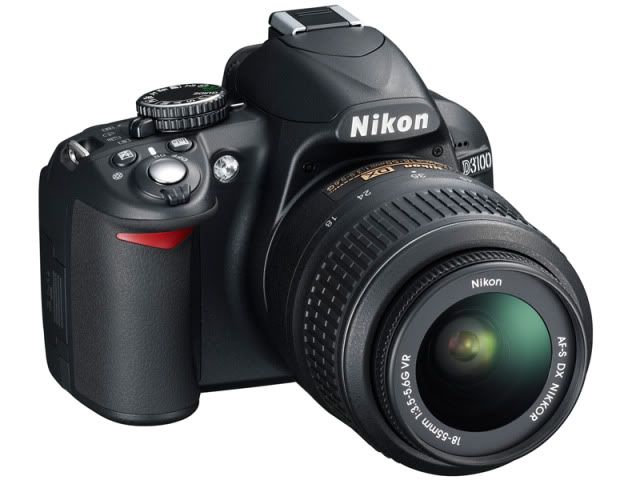
    But things seemed to have finally taken a turn for the better last week. Nikon announced the D3100, successor to the D3000. It will come with 14 megapixels with a base ISO range of 100 to 3200, which can further be boosted to 12800. It is also the first Nikon DSLR to do full HD video recording.

    Photobucket
    Picture from http://dc.watch.impress.co.jp/

    That's better than Nikon's top-end D300s DX format camera, at least on paper!

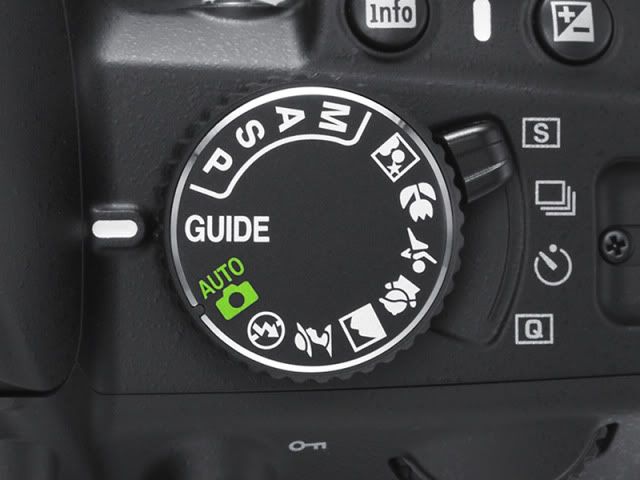
    And for me, one of the most welcome innovation (for Nikon's bottom-end model) besides the brand-new sensor is a physical switch to toggle between Single frame shooting, Continuous shooting and Self-timer. The last option is the Quiet shutter mode. In the D40X/60/3000 as well as the D5000, these options can only be chosen from a menu on the camera's display. Because the camera automatically switches back to normal shooting mode (Single or Continuous) after a Self-timer shot, it was troublesome to do self or group portraits or long exposure shots without a remote, as one will have to change the setting through the onscreen menu to Self-timer again after every attempted shot.

    Photobucket
    Picture from http://dc.watch.impress.co.jp/

    But upon reading the specs a little more closely, I found a deal-breaker. Sort of. The D3100 doesn't work with the cheap Nikon ML-L3 remote, almost an essential accessory for my D40X for the past three years! I suppose the new shooting mode switch makes up for this deficiency to some extent, but that's quite a bummer, really. Shall have to await the D90 replacement, set to be announced in September, to see if there is a better alternative.

    Besides compatibility with the ML-L3, I am watching out for two memory card slots. One memory card failure was all I needed to feel the need for this feature, which allows for instant back-up of pictures taken on a second SD card.

    In the meantime, the Ricoh GXR is looking to be a very interesting (but relatively expensive) option.

    Thursday, August 19, 2010

    A Quick Guide to choosing a new laptop processor

    I decided to buy a new laptop a few weeks ago, after using my IBM Thinkpad X41 for the past 5 years. Boy did the little machine last me long! Last year, I maxed out the RAM to 2GB (from 1.5GB), bought a new battery and even tried to install a solid state drive (SSD) -- which unfortunately didn't work for some reason. Anyhow, I managed to get by for another year, and probably can continue using it for years if I didn't need a more powerful machine for photo editing.

    Yep, for normal uses like web surfing and word processing the X41 still worked perfectly. But after editing photos on it for two years, using Nikon's power hungry Capture NX 2 software, I thought it was time to be more efficient. A new laptop was the only way.

    Unfortunately, the CPU landscape has changed quite drastically since 2005. The latest CPUs have funky names like i3, i5 and i7... and now there are things called quad core processors. (My X41 has a single core Pentium M 1.5GHz processor.) For those who are as lost as I was when I started doing my research, here's a concise guide to choosing what you need.


    The 3, 5, 7's of Intel's processors

    Suffixes
    1. The new processors are generally called iX-XX0M. The suffix "M" tells you that it's a mobile processor. "QM" means quad core processor, and they only appear in the i7 line. "LM" means low voltage, while "UM" means ultra low voltage. The latter two sacrifice performance for lower power consumption and are thus meant for laptops that are lighter and/or tend to run longer on batteries.
    2. Intel calls its top end processors the "extreme editions" and they end in "XM".
    3. Then there is "E", which means it supports a special type of memory called Error Correction Code memory. Irrelevant for most of us. (There are also "LE" and "UE"variants.)

    Other terminology
    1. The clock speed of the processor is the one of the main factors for its speed. They are written as XXX GHz. Bigger number, better.
    2. Except for 4 options in the i7 line, all of Intel's latest laptop processors are dual core. From what I have read, they are mostly faster than the corresponding models in the previous "Core 2 Duo" line.

    i3 vs i5 vs i7
    1. The lowest end laptops with Intel's i3 processor start at higher clock speeds of >2GHz, except for the ultra low voltage version. The main difference is that unlike the i5 and i7 models, they don't have a feature to "turbo boost" their processing power. Despite that, they are fast enough for most typical business type uses.
    2. The i5 is the mid-range line. But there is an anomaly. Some of the i5 "M" processors are actually faster than the i7 "LM" and "UM" processors. The fastest i5 is the i5-540M.
    3. The top-end i7 line starts with some dual core options. The fastest is the i7-620M.
    4. Also of note are the i7-620LM and i7-640LM variants, which are slower than the i5-540M but consume less power, as mentioned earlier.
    5. There are 6 quad core options in the top-end i7 line: i7-720QM, i7-740QM, i7-820QM, i7-840QM, i7-920XM and i7-940XM. They are all power-hungry and laptops that use them are very bulky and tend to last less than 3 hours on a full battery.
    6. Another anomaly: the i7-620M is said to run faster than the i7-720QM when it comes to certain types of programmes, even though the latter has 4 cores to the former's 2. This is probably because the i7-620M has a faster clock speed, which probably matters more to most computer programmes on the market now. This means that the i7-620M is probably better value for money.

    So how to choose?
    Gamers and those looking for a mobile workstation:
    i7-820QM and above. Be warned that these machines are expensive, quite heavy and battery guzzlers. From tests found online, the i7-720QM loses out to the i7-620M when using certain programmes, as mentioned earlier. Might as well make it worth your money and muscle (to carry the heavy machine) by getting something more powerful.

    And for the rest of us mortals...
    Mobility first, performance second:
    i7-640LM or i7-620LM. They are the most powerful low-voltage processors, and the best ultraportable laptops on the market use them.

    Performance first, mobility second:
    i7-620M, or if you want to save some money, i5-540M. If you want to save more money, you can consider the i5-430M.

    Budget:
    The i3 series is probably the way to go then.


    Conclusion
    Hope this helps you in choosing your new laptop. It took me many days of reading up online to get up to speed. Actually, I've stopped reading tech mags and articles since I got my first computer in 1998. In those days, Pentium II 266MHz with 32MB RAM was top end.

    But if you don't need to upgrade now, you should wait for next year's models. Due to be out in the first quarter of 2011, they promise to be faster and more power-efficient.

    In the end, I placed an order for the Thinkpad X201 tablet with an i7-620LM. After using a Thinkpad for the past 5 years, I don't think I can use any other laptop again. Love the keyboard, the trackpoint (aka the little red dot) and the overall asthetics. Hope it arrives in the mail soon!

    Links:
    Intel i7 mobile processor (Extreme edition) lineup: http://ark.intel.com/ProductCollection.aspx?familyId=43403


    Afternote:
    Other important factors to your computer's speed would be the hard disk drive speed and the amount of RAM.
    For the hard disk, try to get one with 7200rpm, or get a solid state drive (SSD) if you can afford it.
    Get 3GB of RAM if you are running Windows 7 32 bit, and at least 4GB if you are running the 64-bit version.